
 CampOS & ConferenceOS · for Rock RMS
Your whole ministry year, in one place.
CampOS joins registration, payments, cabins, health forms, staff, printing and your website on one person record, on your own Azure server (free for qualifying nonprofits). Bring the AI subscription your office already has, and Pearl, the assistant built into CampOS, works across all of it. Built by ministers for ministers.
Free to install and run yourself. No seat fees, no per-camper fees, and no markup on your AI.
Free for ministries that hold our Statement of Faith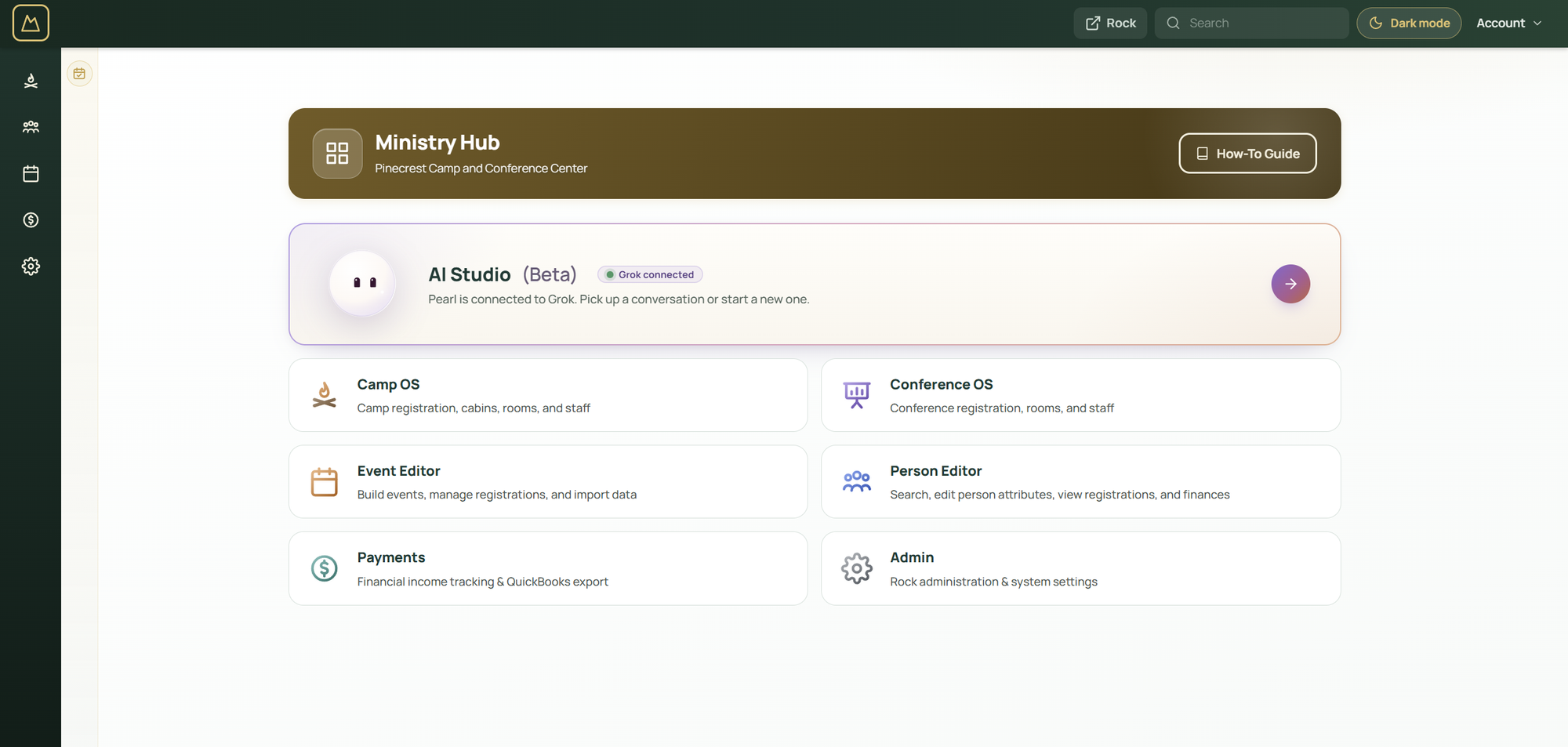
A ministry year runs on dozens of tools. Most of them never talk to each other.
A registration site, a payment portal, a health-form app, a cabin spreadsheet, an e-sign service, a website builder, an email tool, and now an AI chat window that can see none of them. Somebody on staff spends the year carrying information between them. CampOS puts them on one record, and the AI you bring can see that record.
A camper who registered three years ago is the same record the office, the nurse, the registrar, and your AI assistant see today. Nothing is entered twice.
The AI you already pay for, working inside your ministry's records.
CampOS includes AI Studio. Connect the subscription your office already has, Claude, ChatGPT, Gemini or Grok, and Pearl, the built-in assistant, works on your own server with the same records your staff use. We don't resell AI, and we add nothing on top of what you already pay.
Your plan, your pick
Sign in with the plan you have, or use an API key. Switch models whenever you like. What Pearl learns about your ministry stays with her when you do.
One record, every answer
Ask who still needs a cabin, which counselors are missing a background check, or what a family owes across three summers. One record means one answer, not five exports.
You stay in charge
Pearl asks before she changes anything, and you set how often. Every step she takes is listed, and the page she is working on stays open beside the chat.
Real work back
Rosters, spreadsheets, letters and PDFs come back as files you can preview and download, built from your live data.
Most camp software that offers AI sells it as a paid add-on that can only see its own corner. Here the assistant costs nothing extra, runs on your server, and can see what CampOS and Rock know.
Claude, ChatGPT, Gemini, and Grok are products of their respective owners. Stabil Systems is not affiliated with or endorsed by them.
Update your website by asking for it.
Rock already runs your public website. In AI Studio you can ask Pearl to swap the home page photo, fix a date, or add a retreat, and watch the draft change in the preview beside the chat.
No ticket to a web agency, no separate site builder, and no copying text between systems. The same AI subscription does the work.
- Ask in plain words."Use this photo for the home page banner." Attach it and send.
- Watch the draft.Pearl edits the draft site and shows it in the preview pane. Ask for changes until it looks right.
- Press Publish.When the draft is ready, a Publish card appears. A person presses it, and the live site updates.

Fifteen tools that share one record.
Person Editor
Every registration a person has ever had, with cost, discount, paid, and balance on the same screen.
Payments
One payment of any tender split across many registrants at once, including church-sponsored groups.
Cabin and Room Editor
Placement by gender, age, friend requests, and special needs, then drag and drop to adjust.
Parent Checklist
Secure email links let parents fill out forms without creating an account.
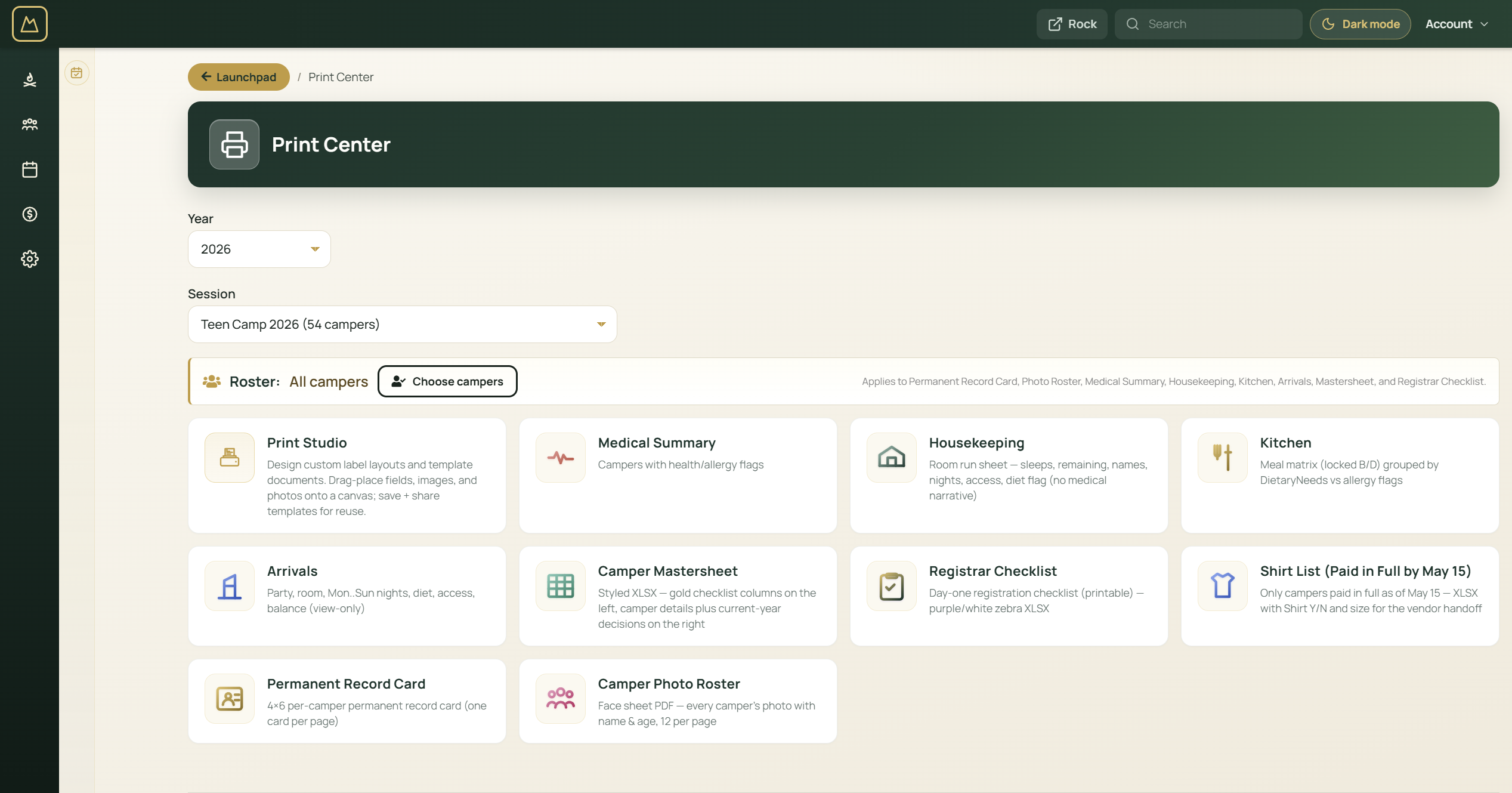
Print Center
Name badges, medical summaries, cabin rosters, and a label designer for your stock.
Financial Income Table
Gateway transactions and manual entries reconciled, then exported to QuickBooks.
Event Pipeline
Every event of the year on one board, with the next step for each: registration, staff, rooms, and print.
Staff Readiness
Background checks, training, and role coverage for every worker across every week, with gaps called out.
Staff Applications
Applications and approvals in the same record the worker will have all summer.
Activities
Schedule campers into activity time slots, with drag and drop and auto-generate.
Camper Bank
Store credit for the snack shop, book store, and missionary offering, posted and refunded at the counter.
Event Map and lodging
An illustrated map of your grounds. Conference guests pick a room from a link, and staff place them.
Mass Registration
Register a whole spreadsheet of campers to an event at once, church groups included.
AI Studio
Your own AI subscription, working across every record above, with your approval on changes.
Website Studio
Edit the draft of your public site with Pearl, preview it, and publish when it is ready.

No new silo. No export window.
CampOS runs inside Rock, which is already your church database, your giving records, and your website. Camp becomes one more thing the same record knows about.
The database sits on your server. There is no retention policy to read and no subscription that has to keep being paid for last year's history to still exist.
| CampOS plugin | Free. No license, seat count, or per-camper fee. |
|---|---|
| Setup | Free to install and set up yourself. Help from Stabil is optional. |
| AI assistant | The subscription you already have: Claude, ChatGPT, Gemini or Grok. CampOS adds no AI fee. |
| Rock RMS | Free, source-available. Each ministry applies to Spark for access. |
| Server and hosting | Your own cloud or on-premise server. Eligible nonprofits usually qualify for a credit that covers most or all of it. |
| Database | SQL Server. The free edition handles most camps. |
| Card processing | Standard industry rates, through the gateway you choose. |
What you would usually piece together, in one place.
| Typical camp software | CampOS | |
|---|---|---|
| Price | Per camper or per seat, every year | Free for qualifying ministries |
| Where your data lives | The vendor's servers, on the vendor's terms | Your own Azure server (free for qualifying nonprofits) |
| AI | A paid add-on, or none, that sees one tool | Your own subscription, across every record |
| Website | A separate builder or an agency | Edited and published from the same place |
| Church records and giving | A different system to sync with | Already there: CampOS runs inside Rock |
Free to set up yourself. Help if you want it.
CampOS and ConferenceOS are free to install and run for qualifying ministries. If you would rather Stabil set them up, connect your AI, train your team, move your data, or run them on cloud infrastructure you control, we offer that as a separate service. Cost scales with your ministry, and no subscription is ever required to use the software.
Want an AI teammate for your ministry office?
AI Studio is the assistant you use inside CampOS. Your Crew goes further: Stabil helps ministries stand up always-on AI workers for registrations, inbox, reports, and seasonal checklists, with staff sending every message themselves and keeping approval on money. See Your Crew for the full offer, including church and parachurch offices that do not run CampOS. Running the agent after setup is paid to the platform provider. Stabil's fee is implementation and setup, separate from that subscription. See what AI can do in the church office.
Conferences and retreats on the same engine.
ConferenceOS ships with CampOS for conferences, retreats, homecomings, and guest groups. Registration and payment attribution work the same way, with room assignment instead of cabins and workshop scheduling instead of activities. One set of records covers both.

Rock RMS is a separately owned platform maintained by the Spark Development Network. CampOS runs on top of Rock but does not include it. Rock is offered on a donation basis by Spark, and each ministry applies to Spark directly. See our licensing terms for full attribution. For setup or ongoing help, see CampOS services. CampOS is for ministries that run their own camps and conferences. It is not a directory for finding a summer camp.

Talk through CampOS on your Rock instance.
We can walk through whether CampOS fits your ministry year, what Spark access looks like, and what an install takes on your server.